Handstand (Adho Mukha Vrksasana): How to Do It, Benefits & Cautions
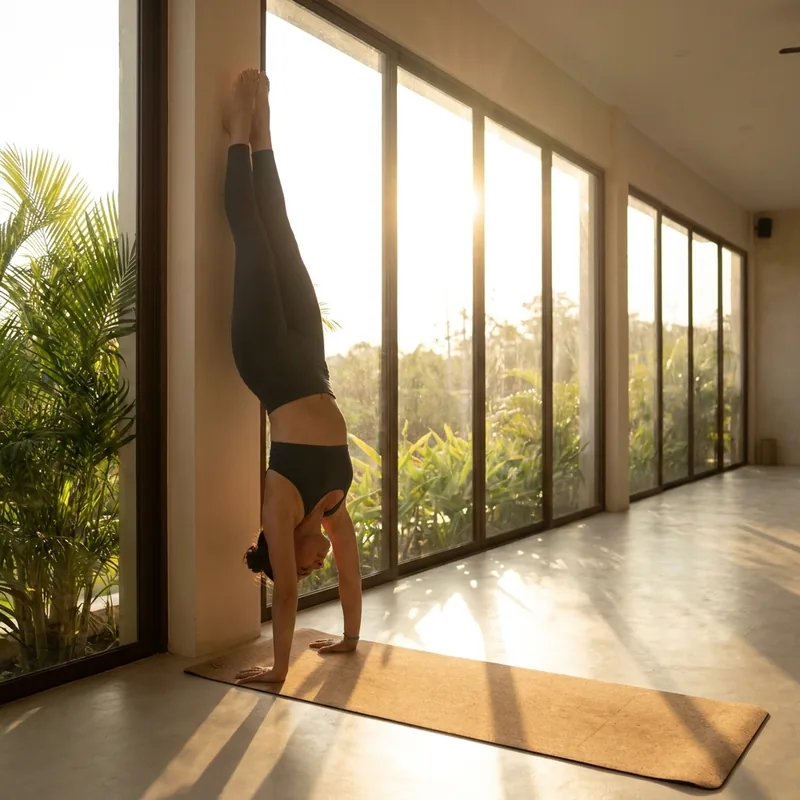
The most challenging balance, stacking the body into one vertical line on the hands.
Level: Advanced · Hold: 10 seconds · Type: Inversion, Balance · Target areas: Arms & Wrists, Shoulders & Neck, Core & Abs
Benefits ✨
- Strengthens shoulders, arms, and core
- Maximizes balance and focus
- Energizes through inversion
Step by step 🧘
1) Place your hands near a wall, stacking your shoulders over your wrists.
2) Lift one leg and kick up with the other.
3) Straighten your core and legs into one vertical line.
4) Use the wall for support and gaze between your hands.
Breathing and cautions 🌬️
Exhale to kick up, then breathe evenly to balance.
- Avoid with wrist or shoulder injuries or high blood pressure
- Always practice against a wall or with a spotter
Helpful props: Wall
How Yoga Play recognizes Handstand 📱
Yoga Play finds your shoulders, elbows, wrists, hips, knees, and ankles in the camera image, then measures the height and angle of each joint relative to your torso length and compares them with the rules for the pose. When every rule is met, the skeleton turns green and the hold timer starts running.
If you drift out of the pose, hints like these appear on screen:
- Get upside down — lift your hips over your shoulders
- Lift your feet up overhead
- Press firmly into your hands
- Straighten your arms
Joint angles read from the sample photo above: knee about 177°, hip about 177°, elbow about 146°. These come from a single photo, so they vary with body proportions and camera angle.
This sample photo does not pass one of the app's recognition rules (Straighten your arms), so the skeleton is drawn in white. In the app, the hold timer runs only once that part is corrected.
Related guides 🔗
A good pose to follow with: Child's Pose
A resting pose that folds the torso forward over kneeling legs to release the whole body.
Yoga Play Pose Guide - All 26 Yoga Poses at a Glance
Browse all 26 yoga poses by level, each with the skeleton recognized by the app.
Yoga Play - Auto Pose Tracker
A yoga app that recognizes your pose with the camera in real time and automatically logs how long you hold it. Practice properly at home with 26 poses, 10 flows, and voice guidance.


Frequently Asked Questions (FAQ)
How long should I hold Handstand?
Yoga Play sets a default target of 10 seconds. The timer runs only while the pose is recognized, and you can adjust hold times in flows.
Is Handstand suitable for beginners?
Handstand is an advanced pose. Try it only once you have enough strength and preparation, ideally with a wall or a teacher's support at first.
How does Yoga Play check Handstand?
It finds your key joints in real time with the phone camera and compares them with the rules for the pose. While the rules are met, the skeleton turns green and your hold time is logged. Video is processed only on your device.