Tree Pose (Vrksasana): How to Do It, Benefits & Cautions
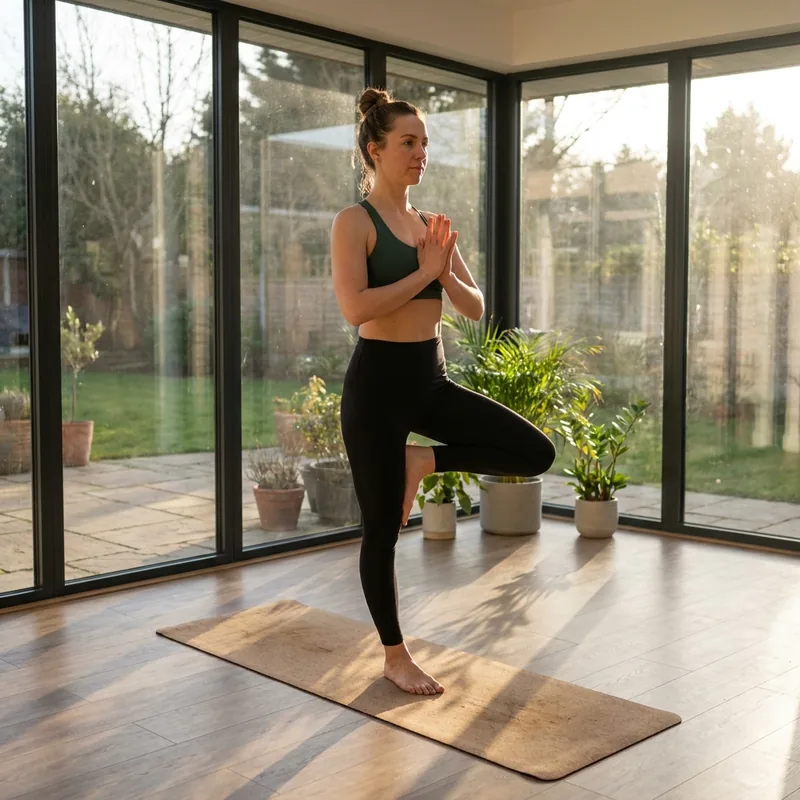
A classic balancing pose on one foot.
Level: Beginner · Hold: 30 seconds · Type: Standing, Balance · Target areas: Legs & Hamstrings, Core & Abs · Done on both sides
Benefits ✨
- Improves balance and focus
- Stabilizes the ankles and legs
- Reinforces upright posture
Step by step 🧘
1) From mountain pose, shift your weight onto one foot.
2) Place the other sole on your inner calf or inner thigh (avoid the knee).
3) Bring your palms together at your chest or reach overhead.
4) Fix your gaze on one point to balance, then switch sides.
Breathing and cautions 🌬️
Breathe evenly and fix your gaze on one point to balance.
- Never press the foot against the side of the knee
Helpful props: Wall
How Yoga Play recognizes Tree Pose 📱
Yoga Play finds your shoulders, elbows, wrists, hips, knees, and ankles in the camera image, then measures the height and angle of each joint relative to your torso length and compares them with the rules for the pose. When every rule is met, the skeleton turns green and the hold timer starts running.
If you drift out of the pose, hints like these appear on screen:
- Stand tall on both feet
- Lift one foot to your standing thigh
Joint angles read from the sample photo above: knee about 179°, hip about 176°, elbow about 13°. These come from a single photo, so they vary with body proportions and camera angle.
This sample photo passes every recognition rule in the app, so the skeleton is drawn in green.
Related guides 🔗
A good pose to follow with: Mountain Pose
The foundation for all standing poses, aligning the body from soles to crown.
Yoga Play Pose Guide - All 26 Yoga Poses at a Glance
Browse all 26 yoga poses by level, each with the skeleton recognized by the app.
Yoga Play - Auto Pose Tracker
A yoga app that recognizes your pose with the camera in real time and automatically logs how long you hold it. Practice properly at home with 26 poses, 10 flows, and voice guidance.


Frequently Asked Questions (FAQ)
How long should I hold Tree Pose?
Yoga Play sets a default target of 30 seconds. The timer runs only while the pose is recognized, and you can adjust hold times in flows.
Is Tree Pose suitable for beginners?
Yes. Tree Pose is a beginner-level pose that you can practice by following the steps, even if you are new to yoga. Stop right away if you feel pain.
How does Yoga Play check Tree Pose?
It finds your key joints in real time with the phone camera and compares them with the rules for the pose. While the rules are met, the skeleton turns green and your hold time is logged. Video is processed only on your device.